Illumos: not what I was waiting for (at least: for now)

So, the Illumos announcement was made. The best analysis of the announcement I read so far is The Register's.

For the moment, I am not impressed at all. What I was hoping in was a "real" Solaris-like system, not a mix of Solaris and Debian/Ubuntu Linux. That's what Nexenta is, after all, and that's what it will still be if it will switch its base to Illumos.

Time will tell if this effort will bring us something decent. I still hope (but less and less each day) that Oracle will keep on investing in an Open-Solaris official distribution. Yes, Open-Solaris, with that dash in between: something that is both a real Solaris, and Open source.

Activating XDMCP in Ubuntu (Karmic)

Once upon a time, there was a small program called gdmsetup that allowed you to fully set-up the graphical login manager. For reasons that it would be too long to explain here, I wanted to enable the XDMCP protocol in my workstation's gdm and… surprise: gdmsetup now is just a single, small, almost useless window…

So, being Ubuntu the "Linux for human beings", how are human beings supposed to enable XDMCP? Editing a configuration file, like we old people used to do. Perfect!!! Let's check: /etc/gdm contains a custom.conf that is the place where you are supposed to write your custom configurations. Ah, it references a sample file, good! What? It doesn't exist??? 😦 And no useful man page?

OK, I have no problem in configuring services by editing a configuration file, that's what I do for living after all 😉 But what about leaving some documentation around to let us human beings learn what to do? Must we really trust Google for things that the Operating System itself should provide?

By the way, it turns out that the [xdmcp] section in custom.conf should look like this:

[xdmcp]
Enable=true
DisplaysPerHost=2

Thanks peppertop, thanks Google, and… $ubuntu– 😦

Update: It turns out that I am very lucky that I was running Ubuntu Karmic, since the GDM that ships with Lucid doesn't support XDMCP at all…

I am starting investigation for my new Linux distro of choice…

Increasing filesystem quotas on Linux

WOW! It was ages I didn't any quota management on Linux!!! But I needed to today, so a short review was needed.

First, as root I had to check what my quotas looked like:

# quota -u bronto ; echo $?
Disk quotas for user bronto (uid 1158): 
     Filesystem  blocks   quota   limit   grace   files   quota   limit   grace
/dev/mapper/homes-home
                5089700* 5000000 7000000   6days     309       0       0        
1

Oh, man! Look that "*" and that return code of "1"! I really was over quota (by chance, that was the soft limit only). I needed to increase it, so I checked the man page and did some dry runs with quotatool. After a few attempts, this line looked fine:

# quotatool -n -b -u bronto -q +2000000 -l +2000000 /home

Running it again without the "-n" showed no error, and running the quota command again confirmed everything was now fine:

# quotatool -b -u bronto -q +2000000 -l +2000000 /home
# quota -u bronto
Disk quotas for user bronto (uid 1158): 
     Filesystem  blocks   quota   limit   grace   files   quota   limit   grace
/dev/mapper/homes-home
                5089700  7000000 9000000             309       0       0        

Good, now I have some more space for my backups, and also a blog post to refer to when I'll have to increase it again in 10 years 😉

System Administrator Appreciation Day at Opera

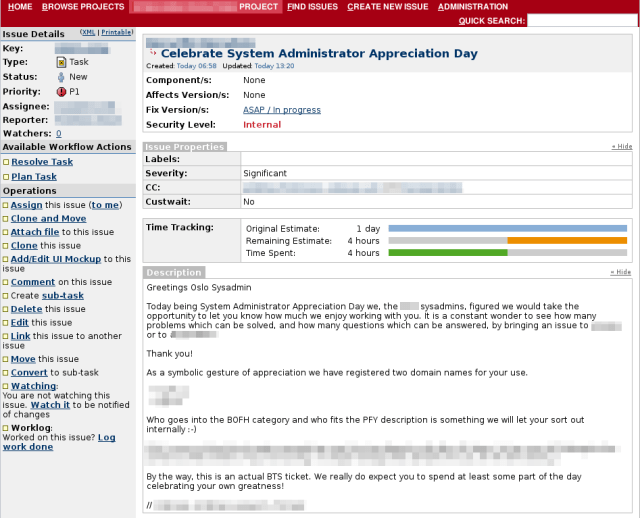
First, we found a nice ticket filed for us, where our colleagues in another office showed their appreciation.

The ticket was filed with the code MOPS-1656, and they've been so nice that they even adapted an existing comic for that:

Then, we were brought in a meeting right before lunch, whose goal was to have us all away from our offices and then go all together in the canteen. When we got in the canteen, we found two "reserved" tables for us, with balloons, candies, and filled with caffeinated beverages.

When we came back to our offices, each one of us found a little candy, and this was mine:

…and, finally… cake! A BIG cake for us!!!

So, to all my Opera colleagues, and for all those that will fill like showing their appreciation in the future, thanks.

SysAdminDay

Perl 6 is out! Erm… sort of

Nota per gli Italiani: date un'occhiata all'annuncio sul sito Perl.it.

OK, it is not the great day that we all Perlers are longing to see, but it's definitely a notable one. The Rakudo and Perl 6 development teams have just announced the release of Rakudo Star, "a useful and usable distribution of Perl 6".

The announcement says:

Rakudo Star is aimed at "early adopters" of Perl 6. We know that it still has some bugs, it is far slower than it ought to be, and there are some advanced pieces of the Perl 6 language specification that aren't implemented yet. But Rakudo Perl 6 in its current form is also proving to be viable (and fun) for developing applications and exploring a great new language.

It's just like mom bought me a new toy to play with 🙂

So, what’s this ntp server doing?

Debugging a multicast ntp server today. I want to see if it's throwing the right IGMP packets, and if it will finally throw those damned NTP multicast packets.

tcpdump comes to the rescue, and it turns out that ntpd is not doing what it's supposed to do, so I am in for further debugging and research 😦

By the way, the tcpdump line I used is:

tcpdump '( (ip multicast) and (dst port ntp) ) or igmp '

PS: forgot to say: that's a Debian Lenny system.

Creating a parser with Parse::RecDescent

Thanks God, configuration files are everywhere, so that you don't have configuration information hardcoded into your programs anymore. And if you have… well, at least you know it's bad practice, don't you?

Anyway, configuration files need to be parsed to extract the information they hold. If the format is a well-known one, you will probably find a library for your favourite language that will do the work for you. If it's not, but it's line-based and simple enough, then writing a parser may be easy. If it's an XML file, things get more complicated but still doable: just use one of the many parsing library around, look for the relevant XML elements, and you're done. Or, if it is up to you to choose the file format, you may use one that is tailored for your configuration library of choice –mine happens to be the AppConfig Perl module.

But, what to do when you fall out of the easy cases? … Continue reading

OpenSolaris: other good signs….

A OpenSolaris Hackathon was just announced. The event will take place in London, and the way the announcement was made seems to open up for good hopes:

Apologies for the late notice, I'm proud to announce what will hopefully be many OpenSolaris Hackathons!

even though they feel the need to say:

This is a community event held by community members and is in no way affiliated with Oracle.

Keep your fingers crossed…