Extracting information from iptables/fwbuilder logs

I use Firewall Builder for fast prototyping of my iptables configuration. When a firewall rule matches and logging for that rule is enabled, one line like this is added to /var/log/messages:

Sep  1 09:48:43 server kernel: [9490931.734574] RULE 12 -- DENY IN=eth0 OUT= MAC=a1:b2:c3:d4:e5:f6:00:11:22:33:44:55:66:77 SRC=1.2.3.4 DST=5.6.7.8 LEN=96 TOS=0x00 PREC=0x00 TTL=58 ID=0 DF PROTO=ICMP TYPE=8 CODE=0 ID=27754 SEQ=0 

(sensitive information has been forged, of course πŸ™‚

Depending on the protocol, the same field is not always in the same position, e.g.: destination port (DPT) could be in position 23 or 24. So if you want to list, say, the inward interface, source address, destination address, protocol and destination port you need a smarter matching. This one-liner worked for me:

perl -alne 'if (m{RULE 12}) { my %field ; foreach $token (@F) { next unless $token =~ /=/ ; my ($k,$v) = split(/=/,$token,2) ; $field{$k} = $v } ; print qq{ @field{ qw{IN SRC DST PROTO DPT} } } }' /var/log/messages | sort | uniq -c | sort -nr   

That perl part means: if the line matches "RULE 12" then I initialize the %field hash. Then I go through the tokens and I select those that contain a "=", I split on the equal sign and fill the hash. Finally, when %field is ready, I print the interesting fields.

I don't need to worry about splitting the line and save the "tokens", because perl's autosplit (-a) takes care of it. And I don't need to bother about printing newlines, because -l takes care of it.

And the sort/uniq/sort dance is the old trick to count the occurrences of he same line in the output.

How to count the occurrences of “something” in a file

This is something we need to do from time to time: filter some useful information from a file (e.g., a log file) and count the instances of each "object". While filtering out the relevant information may be tricky and there is no general rule for it, counting the instances and sorting them is pretty simple.

Let's call "filter" the program, chain of pipes, or whatever you used to extract the information you are longing for. Then, the count and sort process is just a chain of three commands:

filter | sort | uniq -c | sort -nr

The first sort is used to group equal instances together; then this is passed to uniq -c, which will "compress" each group to a single line, prefixed by the number of times that instance appeared in the output; then we feed all this to sort again, this time with -n (numeric sort) and -r (reverse sort, so that we have the most frequent instance listed first).

Nice, isn't it? πŸ˜‰

Improving the pseudo-ini parser

In a previous article I described how to create a parser for a pseudo-INI file. The grammar presented in the post is unfortunately unable to parse inline comments correctly.

I asked for ways to improve it, both on perlmonks and on IRC. After some testing it turns out that a slight change is enough: the first line of the grammar should be changed to:

AsIni: <skip: qr{s*(;[^n]*ns*)?}s> Line(s?) /Z/

Unfortunately, this won't print the skipped content (as CommentLine) does. From the answers I had it's not quite clear if this is actually possible with Parse::RecDescent. Anyway, I am satisfied with the result so far πŸ™‚

Cfengine, some facts and comments

On May 10th, the Norwegian Unix User Group (NUUG) hosted the seminar "Cfengine, some facts and comments" by the very author of Cfengine, Professor Marc Burgess. Audio and video for the seminar are now available for download on NUUG's website; the introduction of the seminar is in Norwegian, but the whole speech by Burgess is in English. So, if you are interested in the subject of configuration management tool, go get it now πŸ™‚

Debugging NTP again (part 4 and last)

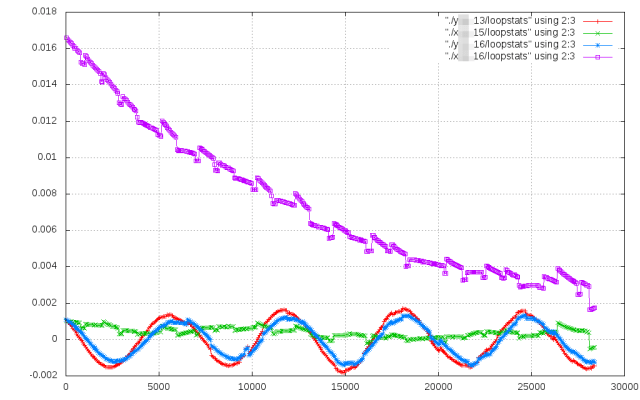
I finally got the Xen servers' clock to stabilize! The clocks kept converging overnight, and are now sporting a very little offset -so little that the graph for today have visible hiccups.

The problem appears to be caused by a kernel bug. If it was fixed in more recent kernels and/or patches, I just don't know. Anyway, the kernel bug is worked around if you set disable kernel in your ntp.conf. Besides, you should set xen.independent_wallclock to zero, and set your clocksource to xen.

Sure, it would not have been possible with the help of other people, so let's tell the full story and provide acknowledgements for those who deserve it. … Continue reading

The end of OpenSolaris (as we know it)

I don't know if this is a real document, and if it is, I don't know if it actually leaked or if it was "left around" intentionally to be disclosed, so that Oracle didn't have to make any official statement about OpenSolaris. If we assume that it is true, then OpenSolaris (as we know it) is dead:

All of Oracle’s efforts on binary distributions of Solaris technology will be focused on Solaris 11. We will not release any other binary distributions, such as nightly or bi-weekly builds of Solaris binaries, or an OpenSolaris 2010.05 or later distribution. We will determine a simple, cost-effective means of getting enterprise users of prior OpenSolaris binary releases to migrate to S11 Express.

So, those who used and liked OpenSolaris before have to wait the end of the year, and clearer announcements from Oracle, to know if they'll really be allowed to use Solaris 11 Express as an Open operating system. Yes, I know what's written above here, but we don't know if it is a real internal document from Oracle, so any conclusion must be drawn with care. … Continue reading

Debugging NTP again (part 2)

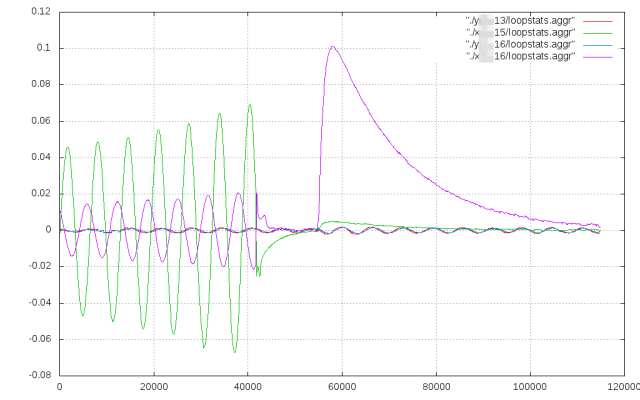
If you wonder what I tried yesterday, well here you are. I tried to make one of the two crazy servers a unicast client. I hoped that having the chance to decide when to poll the stratum 1's would help them to adjust better. Although a bit "irregular", it seemed to work better for a while. Unfortunately, when I came back to the office today and looked at the graphs, it eventually started to oscillate more and more during the night, until it had a reset today. The other one is still going bad, of course.

One more day has passed, and still looking for a solution… … Continue reading

Debugging NTP again (part 1)

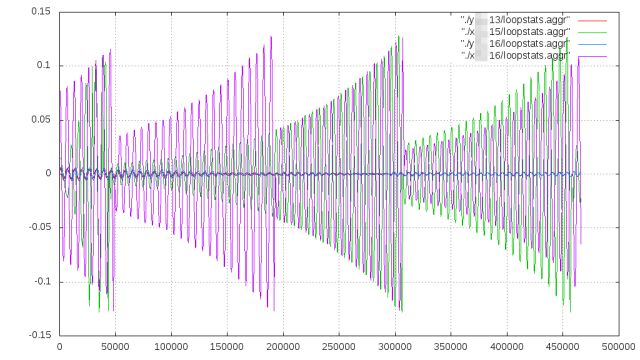
Xen servers are well known for having time synchronization problems. I have a few here, too. Two datacenters, with three multicast NTP servers and two Xen servers in each. And in each datacenter, one of the Xen servers is working like a charm, while the other's offset keeps oscillating more and more, until ntpd resets, and the cycle starts again. Using known workarounds just made things worse.

Having a Xen servers's clock suddenly going backwards from time to time isn't any good. This really calls for a deep debug. … Continue reading